
Screenshot by Destructoid
Do you want to build a snowman?

|
Star Path events sometimes ask you to take pictures with certain items, characters, or locations around the village in Disney Dreamlight Valley. One such task you may encounter challenges you to take one photo with a non-talking snowman.
It can be a bit tricky to figure out what this task is referring to, but luckily, it’s a fairly easy one to get done once you know what you’re looking for. If you’re struggling to solve what this task is asking of you, here’s how to take one photo with a non-talking snowman in Disney Dreamlight Valley.
What is a non-talking snowman in Disney Dreamlight Valley?
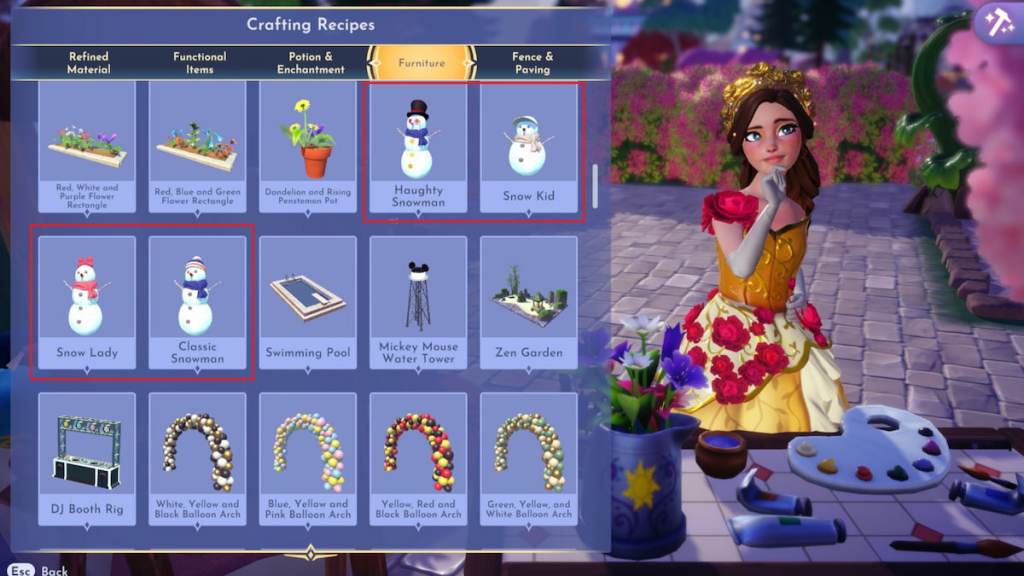
A non-talking snowman for the Winter Warmth Star Path event is any craftable snowman you can make and place around the valley, which includes the Haughty Snowman, Snow Kid, Snow Lady, and Classic Snowman. Snapping a picture with Olaf doesn’t count for this task, as he’s a talking snowman rather than a non-talking one.
Each snowman has a unique set of required materials, so here’s what you need to make each one.
- Haughty Snowman
- 10 Snowball
- One Crystal
- Two Fabric
- Two Ruby
- Snow Kid
- Eight Snowball
- One Carrot
- Two Fabric
- Three Pebbles
- Snow Lady
- 10 Snowball
- One Carrot
- Two Fabric
- Three Pebbles
- Classic Snowman
- 10 Snowball
- One Carrot
- Two Fabric
- Three Pebbles
If you already have a crafted snowman, you don’t need to make a new one. Simply place it down anywhere you like so you may get to work on this mission. Another duty in this event does ask you to craft a snowman, though, so you will still need to make one at some point if you’re hoping to earn as many event Tokens as possible.
Take one photo with a non-talking snowman in Disney Dreamlight Valley

To complete the take one photo with a non-talking snowman task, you need to snap one picture that includes a crafted snowman. To do so, you’ll need to place one of the four qualified snowmen down somewhere around your villager, equip your phone from the Royal Tool wheel, and take a picture that has the snowman in frame.
Successfully completing this task gets you a whopping 50 Tokens to spend in the event. This is a massive prize for a duty that requires fairly minimal work, so it’s certainly worth tackling. If you still need more Tokens to claim the prizes you’re after, there are plenty of other missions you can complete, like digging for special crystals underground, cooking a fairly fancy dinner, and selling snowman building material.


Published: Dec 19, 2025 06:19 am