
Forza Horizon 6’s bootful of PC-specific tech features was apparently stuffed enough to warrant a big, colourful blog post about them. Ultrawide support? Yes. DLSS 4 and FSR 4? Both. Ray tracing? A resounding hai, those souped-up lighting and reflection effects escaping FH6’s car-ogling mode and adorning its open world for the first time in the series.
Actually playing the thing, however – and/or spending enough time in its benchmarking tool – reveals that its PC performance highlights mainly concern the absolute basics. On standard settings this is most definitely a smooth-running game, one that’s capable of scooting along on budget builds and handheld PCs while zooming through frames on powerful graphics cards. But, that’s not necessarily with the help of bleeding-edge tech. Upscalers like DLSS disappoint more than they impress, and the performance tax levied by those RT effects will drag you down from supercar luxury to framerate poverty.
Clearly, a settings guide is in order, as is an overview of what happened to Forza Horizon 6 when I threw a bunch of different GPUs at it.
Forza Horizon 6 system requirements and PC performance
Outside of the fact that it takes up one-hundred and fifty-five gigabytes of SSD space once installed, or about 100GB more than should be socially acceptable for a racing game, I can’t complain too much about the hardware needs here. 16GB isn’t an unreasonable floor in 2026, even with ongoing price fuckery, and the minimum CPUs/GPUs are either ancient or dirt cheap. They’re for a respectable 1080p/60fps, too – no miserable 720p/30fps target, like some games’ min specs aim for.
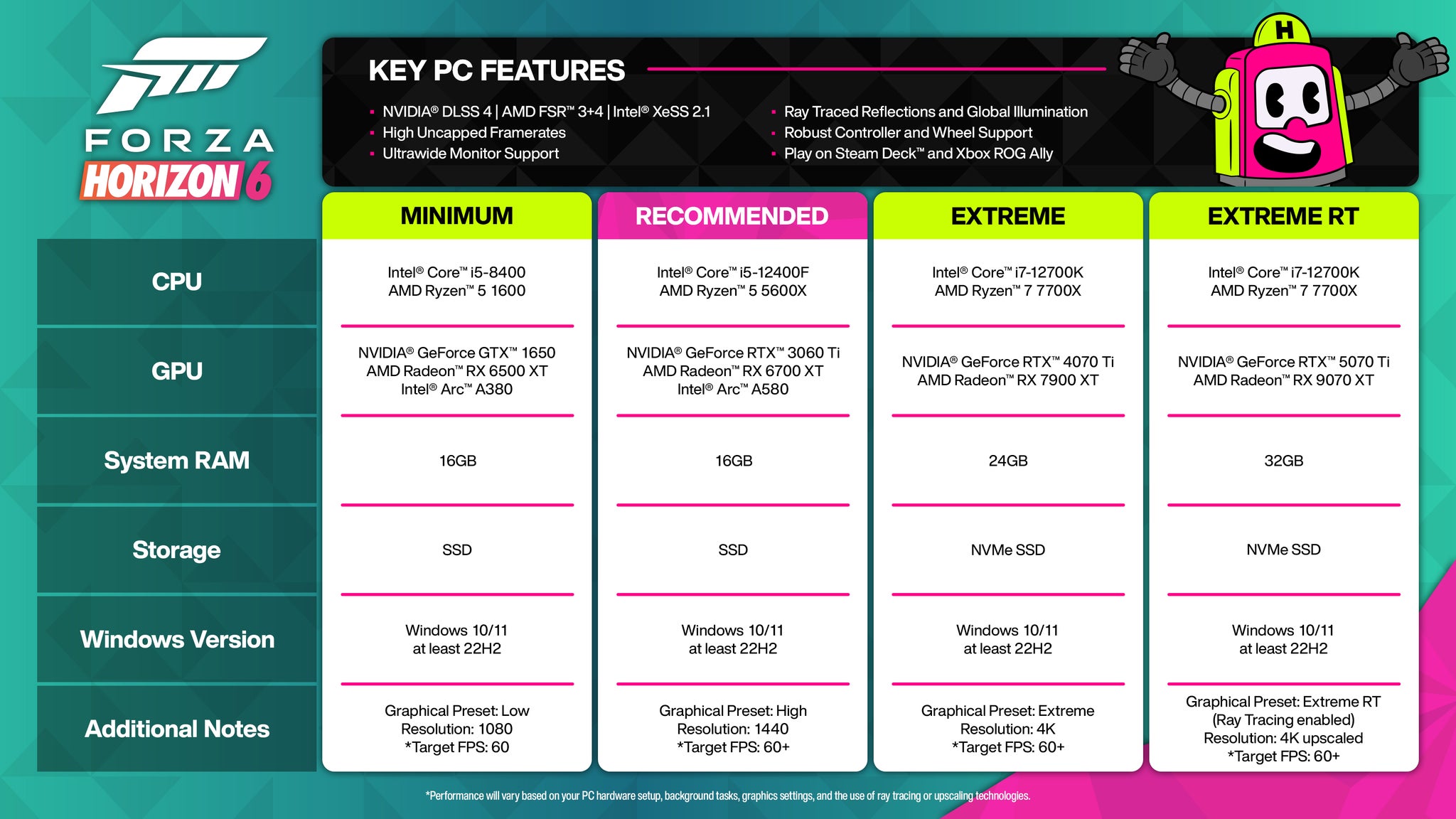
If you’re on even older kit, and don’t mind missing out on the 60fps promised land, sub-minimum components can work too. I tried a GTX 1050 Ti (which shares a lot of specs with the GTX 1650, but it ultimately much weaker) and at native 1080p, with the Low quality preset, it averaged a pass-grade 32fps in the benchmark tool. Dropping to Very Low bumped that up to 43fps, and in the game proper, this preset could in fact manage 55-60fps while tearing around the map’s less demanding regions.
In terms of outright 1080p recommendations, though, the RTX 4060 and Intel Arc B580 are much higher on horsepower. On the High preset (and with zero upscaling help), the former cruised to 96fps, and the latter 111fps; the B580 could even manage the top-of-the-line Extreme preset at 77fps, though the RTX 4060 was a bit inconsistent at this level, averaging between 54fps and 64fps across multiple runs.
Both cards were also fine for 1440p, although this was also where I first discovered Forza Horizon 6’s upscaling problems. In short, they struggle to produce the framerate boosts that they’ve proven able of in so many hundreds of games before: the RTX 4060, for instance, averaged 43fps on Extreme at native 1440p, and only rose to 48fps with the addition of Quality-level DLSS. The Arc B580 did better, scoring 62fps at native and 74fps with Ultra Quality XeSS (Ultra Quality being the equivalent to DLSS/FSR’s Quality mode), but that’s still a relatively minor uplift. Likewise with the newer RTX 5050, which produced 54fps at 1080p/Extreme and could only creep up to 60fps with Quality DLSS.
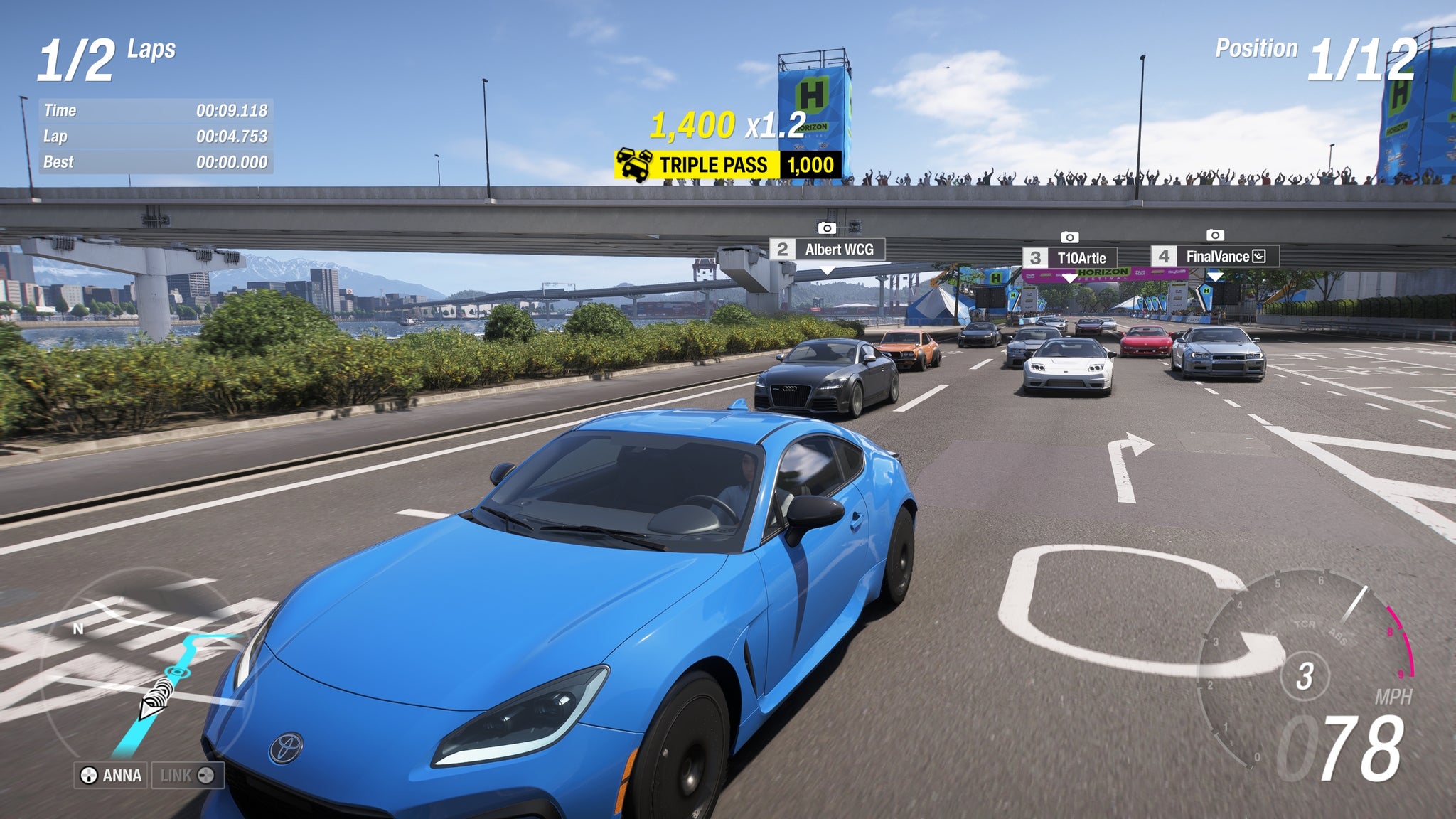
Still, I persevered with upscaling to the higher resolutions, the RTX 4070 Ti – listed under the official specs’ ‘Extreme’ tier – reaching 79fps at 4K with both the Extreme preset and Quality DLSS in play. Supersampling grumbles aside, that’s really not bad for a years-old card that was technically intended for 1440p use. The same goes for the RX 9070 XT, which hit 90fps on equivalent 4K settings, including the latest FSR 4 replacing DLSS. Get a ‘true’ Ultra HD card and breaking the 100fps+ barrier is possible, as demonstrated by the RTX 5080 averaging 111fps on Extreme and Quality DLSS.
Such an abundance of frames, across all resolutions and GPU tiers, is encouraging. Racing games simply feel better when they’re running faster, owing as much to the lowered input latency that a high framerate brings as to the visual pleasures of the performance itself. It’s all the more unfortunate, then, that those shiny new ray tracing effects aren’t nearly as slick.
Slapping them on a compatible, yet lower-end PC will likely see those high framerates collapse: the RTX 4060, which got that 54fps minimum on Extreme/1080p, fell to 33fps just with Low-quality RT reflections enabled. And the much beefier RX 9070 XT, which the official specs specifically name as a ray-tracing-ready GPU, dropped from 90fps to 54fps after switching from the Extreme preset to Extreme+RT (which sets both RT reflections and RT global illumination to High).
Even the RTX 5080 isn’t immune, its 63fps on Extreme+RT a far cry from its rayless 111fps. Worst of all, I’m not even convinced that these effects make Forza Horizon 6 look much better. There are certain reflections that appear more detailed – on water, especially, and on a few well-cleaned glass skyscrapers down in the game’s compacted rendition of Tokyo. But these are relatively isolated upgrades, and part of me prefers the starker, higher-contrast look of standard global illumination. See what you think:


I’m not saying Forza the Sixth runs badly in general. Without ray tracing, the opposite is true: rasterised settings are, as car people like to say about engines, sweet as a nut. But it is ironic that this long-awaited addition to the series’ box of PC tools immediately starts jamming up its gears.
Not all of the new tech is a letdown, mind. DLSS frame generation, which in other games can oscillate between ‘reasonably nice gloss layer’ and ‘hateful bullshit’ depending on the implementaton, is on the former end of the scale here. Because most PCs will be able to get FH6 going at high conventional framerates, frame gen can simply add visual smoothness to already-nippy performance; it’s not trying to put makeup on sludge. The RTX 5080 jumped from 63fps at maxed-out 4K to 110fps with 2x generation, while the basic RTX 5050 upped its 60fps at upscaled, Extreme-quality 1080p to 106fps. In both cases, the impact on input lag (which typically rises with frame gen) was negligible. As RTX 50 series GPUs, both can also engage 4x generation, getting the RTX 5080 and 5050 up to 195fps and 170fps respectively. Although, since this did add a little latency to the controls, 2x remains the way to go.
4x mode also makes it much more likely that you’ll spot mushy-looking graphical artifacts out of the window of your modded Honda, which rather spoils the go-faster fantasy somewhat. Though as it happens, this isn’t the only way that DLSS can meddle with the visuals. Several of the upscalers, on top of producing underwhelming framerate gains, can also introduce visible ghosting – and not just the type where you’d need one of Digital Foundry’s magnifying glasses to see it, but glaringly obvious duplicates of details like car aerials and spoiler edges:

I’d say this was an upscaling issue, as both Nvidia DLSS and Intel XeSS have shown it in my testing, but then it can also appear when using DLAA: DLSS’s native-rez antialiasing cousin. At the very least, the ghosts of antennae present do only materialise on very specific details, and only against relatively flat, consistent background textures like tarmac, as opposed to grass, trees, or buildings. That’s no excuse, though, and I’ve made enquiries as to whether this is a known issue that might be fixed.
Luckily, and unlike so many other modern games, Forza Horizon 6 does not use supersampling as a crutch for heaving ‘core’ performance, nor is its use of ray tracing a mandated must. Fundamentally, this is a racer that runs well and looks plenty nice enough on the most straightforward of settings – regardless of whether its bells and whistles need some brass polish.
Even the Steam Deck can handle it, and at not-quite-rock-bottom quality. The Low preset looks a fair deal prettier than Very Low, and while it’s slightly more prone to chugging around Tokyo, pairing with FSR 3.1 was enough to keep me above 30fps, with framerates rising to the mid-forties out in the sticks and even touching 60fps up in the northern mountains.

Forza Horizon 6 best settings guide
Another technical do-good of FH6 is that for all the lightness of its touch, it’s also quite hard to make ugly. You really need to drop down to Very Low before things really start looking off, and while I’d want to avoid settling for Low on a big desktop display, it works well enough within the confines of a lil’ handheld screen.

1920×1080, Extreme quality, TAA
These high standards also mean I’m going to break with an RPS settings guide tradition. Usually, we’d use the highest preset as a starting point, and then make individual settings reductions from there, keeping as many maxed-out as possible. As you can see with thine own eyes, however, Ultra is not a significant step down from Extreme, despite running considerably quicker: 70fps versus 54fps on the RTX 4060 at 1080p. It is therefore Ultra that will form the basis of our custom-tweaked configuration, which I’ve landed on after testing the performance impact of each setting individually.
- Motion blur: Short
- Resolution scaling: DLSS/FSR on Quality
- Frame generation: Off
- Nvidia Reflex Low Latency: On, if supported
- Car level of detail: High
- Environment texture quality: Medium
- Environment geometry quality: High
- Car reflection quality: High
- Screen space reflections quality: Medium
- Raytraced reflections quality: Off
- Shadow quality: Ultra
- Night shadows: Ultra
- Screen space GI quality: High
- Raytraced GI quality: Off
- Shader quality: High
- Audio quality: Ultra (not sure why this is in the graphics sections but okay)
- Deformable terrain quality: Ultra
- Particle effects quality: High
- Volumetric fog quality: Ultra
- Lens effects: Low
- Motion blur quality: High
“James, you feckless egg,” I hear you typing. “You just said DLSS was slow and a bit broken, yet it’s the second setting you’d switch on?” With some reluctance, yes. It’s true that Nvidia’s upscaler is off its game, but for RTX graphics cards, it’s still the least worst anti-aliasing option of the bunch. Native TAA somehow manages to look blurred and jaggedy at the same time, FSR 3.1 has a fuzziness to it even at higher resolutions, and XeSS has the same ghosting problem without matching DLSS’s clean edges. In truth, I’ve also only seen that ghosting on two specific car models across the dozens that I’ve driven, and only for a few minutes out of over 10 hours played. And maybe other games can extract more frames with upscaling, but still, a small handful is better than nothing.
This, plus the extra speed from dropping settings like environmental textures and screen space reflections, got my RTX 4060 averaging 92fps – no small improvement on the 70fps that it scored with the unalloyed Ultra preset. I’ve left frame generation off in the list, as it’s never personally been my bag, but if you’re consistently achieving such high ‘natural’ framerates then you could flip it on without much drawback.
Ray tracing, on the other hand, can go back in its Forzavista box. Near-enough halving performance is something I’d expect from full fat path tracing, not a couple of specific RT effects; happily, neither of them are remotely necessary.


