
DLSS 4.5 is out now, and while previous new versions of Nvidia’s performance-massaging upscaler would have required waiting around for game implementation – beyond the inevitable Cyberpunk 2077 debut, anyway – it follows more recent additions in letting you impose it upon existing games from the off. That’s done via the Nvidia App and its DLSS Override tools, which following an update on January 14th, is tooled up with what version 4.5 promises to be tangible visual improvements.
I’ve been testing it, both on this public Nvidia App release and on a pre-release beta build, and DLSS 4.5 can indeed deliver on the right settings. But it’s also more of a specialised tool than DLSS 4, and although backwards compatibility is welcome, it’s presented with an opaque naming system that has as much in common with algebra as it does with upscaling.
Watch on YouTube
Happier words are coming, honest, but it’s worth running through how DLSS 4.5 overrides work, both in case you want to try it yourself and if Nvidia end up further expanding the system in the face of competition from AMD FSR Redstone. Open the app’s Graphics section and for each of your installed PC games, you have the option to custom-set a Super Resolution (i.e. upscaling) preset. These each represent different versions and sub-versions of DLSS, also called models, many of which are optimised for very specific conditions. Conditions like, say, the combination of a particular native monitor resolution and a particular DLSS quality mode setting (Quality, Balanced, Performance etc.).
All well and good – you’ve got options to suit your setup. But because models/presets are only named alphabetically, with no provided description of when best to apply them, they’ll be incomprehensible to the uninitiated. For example, Model B (called ‘Preset B’ in the app, but I’m sticking with the ‘Model’ naming Nvidia use everywhere else) is specifically tuned for DLSS’ Ultra Performance mode, but that isn’t communicated anywhere in the app. Nor is the fact that to actually engage DLSS 4.5, which is built around an upgraded ‘Transformer’ upscaler introduced in DLSS 4, you can only choose from Model L or Model M.
The good news, which I can share now that I’ve spent probably far too long trying to do a Rosetta Stone on what all these models are, is that in 2026 you only really need to concern yourself with four of them – regardless of your resolution or graphics cards. Provided it’s an RTX GPU, anyway. That’s still important.
DLSS override presets explained
Since most presets/models will activate outdated DLSS versions, the four you should be sticking to are Model J, Model K, Model L, and Model M. J and K pull from the DLSS 4 toybox of clean first-gen Transformer upscaling, while L and M use DLSS 4.5 and its enhanced motion handling and sharpness. They all differ slightly within their version numbers, though:
Model J is, practically speaking, DLSS 4 as it originally launched, including the first version of the Transformer tech that shows off higher detail reproduction and less ghosting than DLSS 3’s Convolutional Neural Network (CNN) model.
Model K is extremely similar to Model J on both looks and performance, though it can do a better of tidily upscaling in-game vegetation (bushes and the like) without the creation of ugly visual artifacts.
Model L adds DLSS 4.5’s anti-aliasing improvements, but is specifically optimised for running DLSS in Ultra Performance mode while playing at 4K.
Model M, is, therefore, a more generalist DLSS 4.5 option. It’s still meant to work especially well in Performance mode, but Balanced, Quality, and native DLAA should all be good fits as well.
Models L and M also rely on Nvidia’s FP8 datatype, which RTX 50 and 40 graphics cards can converse in fluently – unlike RTX 30 and RTX 20, which on paper, won’t see the same level of performance gains as a result.
Hopefully that all makes sense? Or at least more sense than the Nvidia App makes. Wouldn’t be hard.
DLSS 4.5 visuals and performance testing
Now that you know what exactly you’d be enabling with DLSS overrides, we can turn our attention to how DLSS 4.5 performs – and how it polishes up the previous version. For testing purposes, I’ve stuck to Model K in the DLSS 4 corner (since it’s more or less just an enhanced Model J) and Model M for DLSS 4.5, as it’s ostensibly more versatile than Model L.
Predictably, Cyberpunk 2077 serves to show the image quality changes in action. Not to overstate them, mind. As we see here, running on an RTX 5080 at 1440p (including Performance-level upscaling), there’s really not much in it at a glance. Both Model K and Model M look crisp and free of errors:
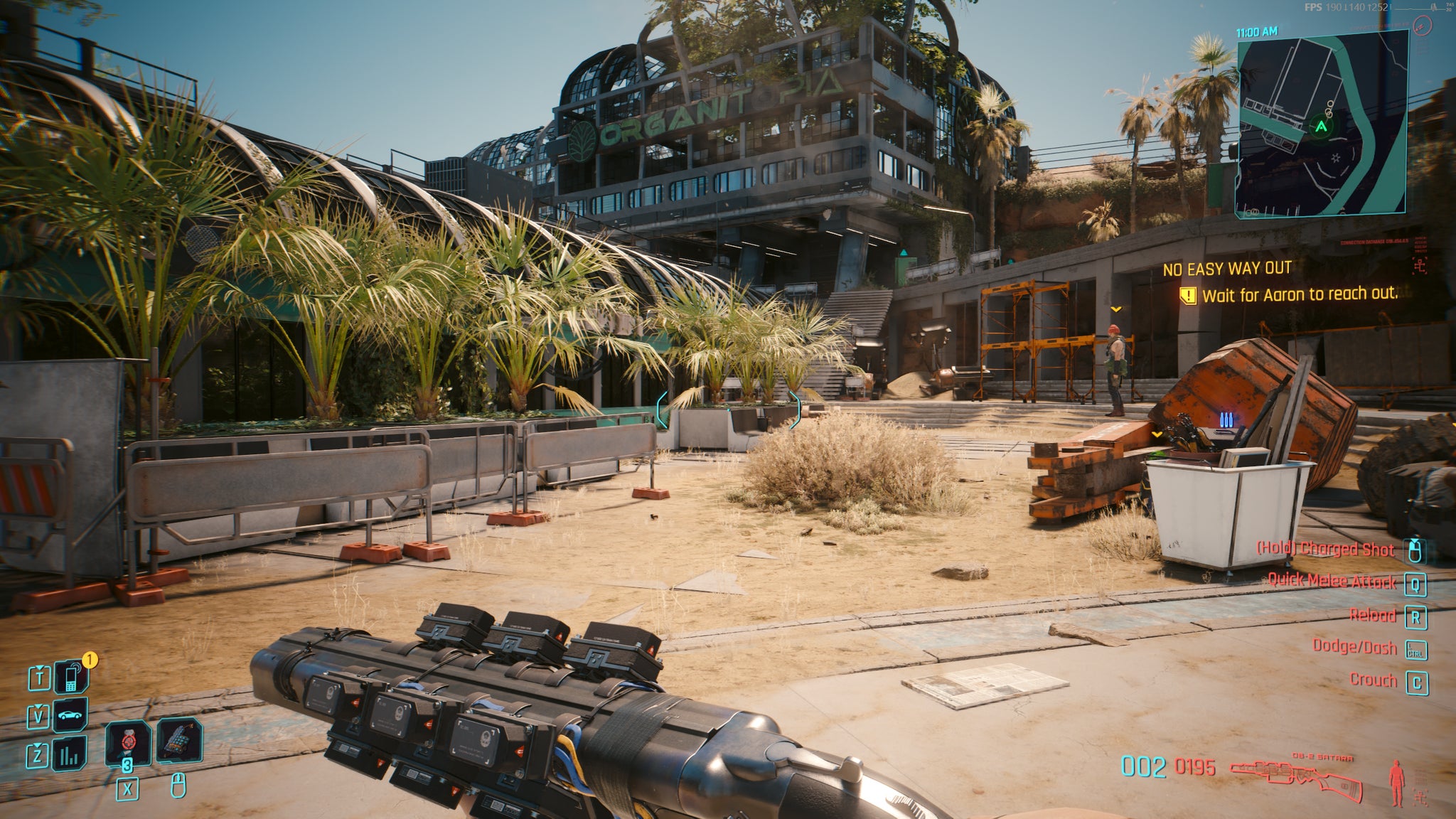

However, a closer look confirms that DLSS 4.5 and Model M’s anti-aliasing have the, if you’ll pardon the word choice, edge. Both curved and straight lines look slightly less jagged on the newer upscaler, and very fine details aren’t as obviously pixellated, as this little bush demonstrates.

Model M is also more of a dab hand at reducing ghosting and other flavours of movement-induced wonkiness. Here’s another zoomed-in comparison of shots taken while strafing to the right – on the older Model K, there’s a bit of pixelly warping around the left edge of the gun, most visibly where it overlaps with the fence. Model M leaves much less of a visible trail.
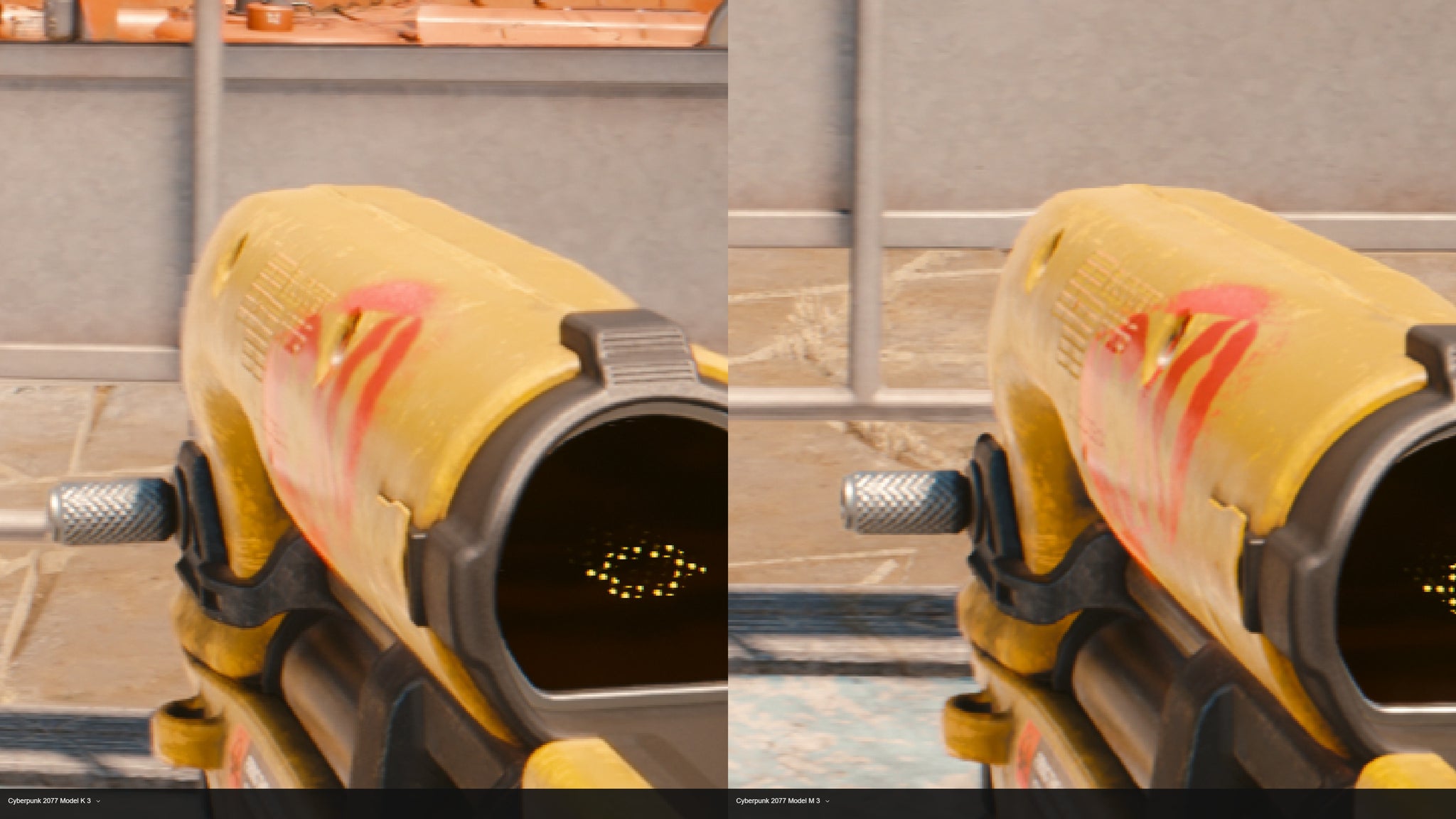
Maybe, considering the amount of zoom-and-enhancing going on in this article, DLSS 4.5 is not the head-turning upgrade that FSR Redstone was over FSR 3. But then, it never claimed to be, and the improvements it does make over DLSS 4 are worthwhile, especially on faster modes like Performance.
Why, then, call it more of a specialised tool than a direct, obsolescence-inducing replacement? The answer lies in performance – which is, remember, the entire reason why game upscalers to exist in the first place. And consistently, DLSS 4.5 is slower than DLSS 4.
On some hardware configurations, this may not be much of an issue. Even in a game as demanding as STALKER 2: Heart of Chornobyl, switching from Model K to Model M barely cost our RTX 5080 any frames; Performance mode in particular only lost a single frame-per-second on average. Cyberpunk 2077 saw a bigger dip on Quality mode, albeit when the RTX 5080 was still dishing out enough frames that you probably couldn’t see the difference.
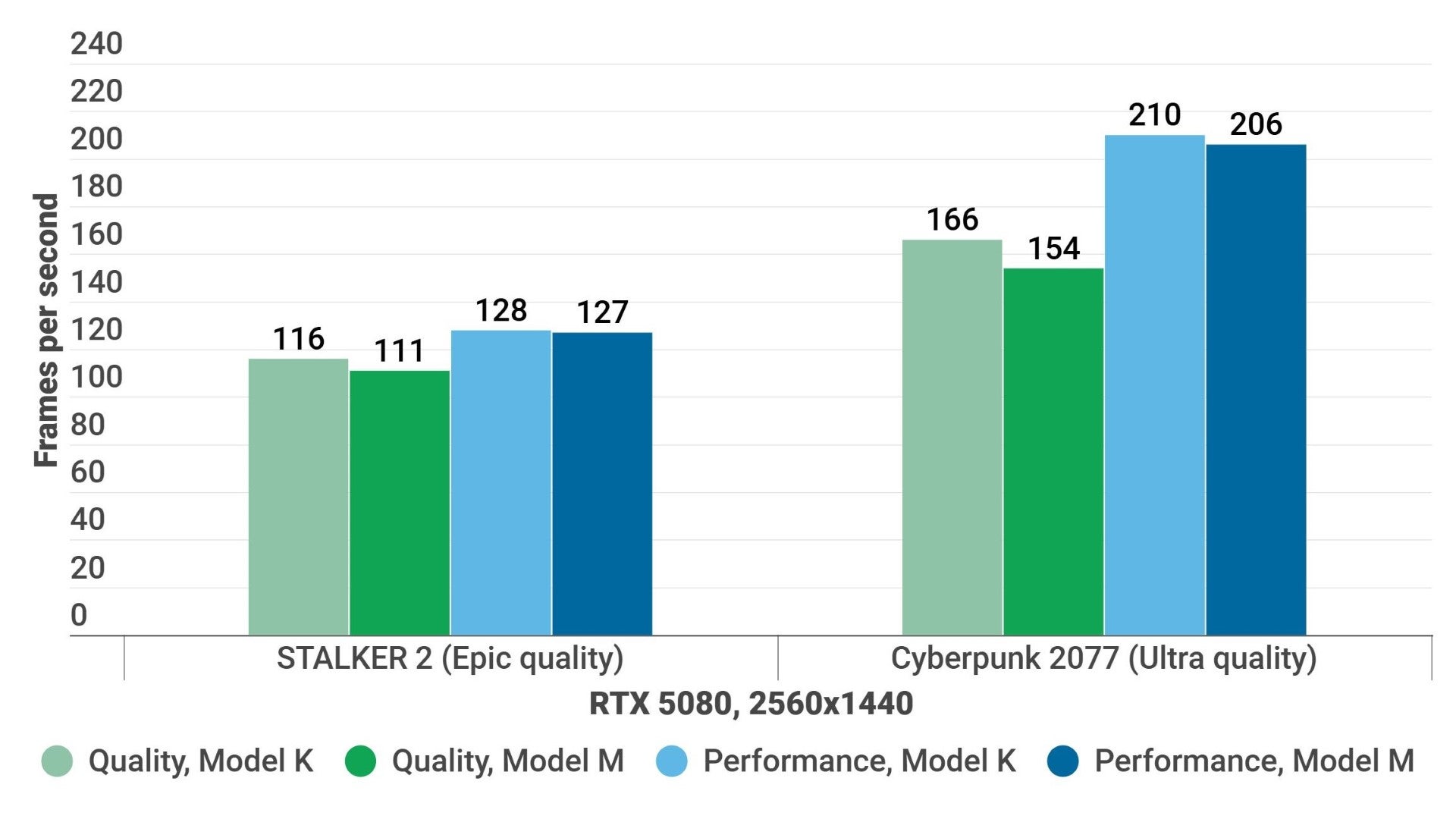
In other words, you might be fine if you’re already running a GeForce GPU that’s both a) powerful and b) new enough to have native FP8 support. When I tried an RTX 3080, on the other hand, Model M’s performance dips became much easier to trip into.
Again, it seems to be Quality mode that suffers most, losing about 10% average frames in STALKER 2 and nearly 20% in Cyberpunk 2077. With the latter, that’s easily enough for a trained eye – belonging to someone who owns a 100Hz-plus refresh rate monitor – to spot the downgrade. Performance mode is close enough in STALKER 2, but again, a 20fps-ish fall in Cyberpunk 2077 shows the cost of trying to claim DLSS 4.5’s quality gains on older hardware.

That said, Performance mode specifically does benefit greatly on Model M, so if you’ve previously been willing to drop that far down the upscaling quality tiers… y’know what, yeah, I’d say give DLSS 4.5 a go anyway. With Balanced or Quality, the visual differences are naturally going to be harder to spot, thus making the performance cost harder to justify. Unless you’re lucky enough to be wielding a monster card like the RTX 5080, of course.
Still, I don’t want to sound down on DLSS 4.5 for being a more situational step forward than DLSS 4. Graphics tech is notoriously fast-moving and I’d much rather see smaller yet (partially) hardware-agnostic updates arriving more often, versus the apparent alternative of bigger revamps only coming once every two years. Usually with all the best features locked to a new, more expensive family of GPUs. Model M also looks good enough that newer PCs should absolutely give it a crack.
All the same, if Nvidia are going to give us the freedom slap newer DLSS versions on older games, I don’t think it’s too much to also ask that they be labelled, explained, or otherwise offered in more accessible terms. Between upscaling, ray tracing, path tracing, and about nine different types of frame generation, PC players have enough graphical variables to consider without also needing to learn a list of model codenames.


