
As you progress through your save in Paralives, there will likely come a point where you wish to move and start fresh somewhere else in Melino. Figuring out how to move houses can be quite tricky the first time around.
Whether you’ve just stumbled upon a Paradime fortune and are looking to build a new mansion or are hoping to break up your active household for storytelling purposes, there are plenty of reasons you may wish to initiate this change. Fortunately, it’s fairly easy to do after you figure out the process the first time around, so here’s how to move houses in Paralives.
How to move in Paralives
You can move houses in Paralives by selecting the new lot you wish to purchase from the map. If you’re having trouble figuring out how to make this happen, here’s a full breakdown of the process to help you through it.
- Zoom out to the world map. This can be done by using the scrolling button on your mouse to switch from the main view to the map view, or by pressing M on your keyboard to instantly jump to the map.
- Locate and select the lot you want to buy. Look around the town of Melino for a lot you like that has a “For sale” sign on it. These lots are marked by a blue house icon, while lots that are already inhabited have an orange house icon.
- Select the Purchase option. Once you’ve found the lot you want to move your house to, choose the Purchase option on the pop-up near the upper right corner. If you don’t have enough Paradimes to buy your new dream lot, you may wish to use money cheats or other cheats to make this transaction possible.
- Sell your old house if you want. If you have enough funds, you can own both lots at once, so this step is optional. If you want an entirely fresh start, though, you can click on your old lot and select the “Sell this lot” option to get rid of it.
How to split household in Paralives
You might be seeking to break up the household you’ve got instead of having everyone move together. If this is the case, you’ll need to split the household, which can be done by zooming out to the world map, clicking on the house icon for your active lot, and selecting the “Split household” option.
Upon selecting this option, a pop-up will appear, allowing you to modify a few key features to finalize the process. This includes choosing which Paras move out and how much money from your household’s collective Paradime pool you want to give them.
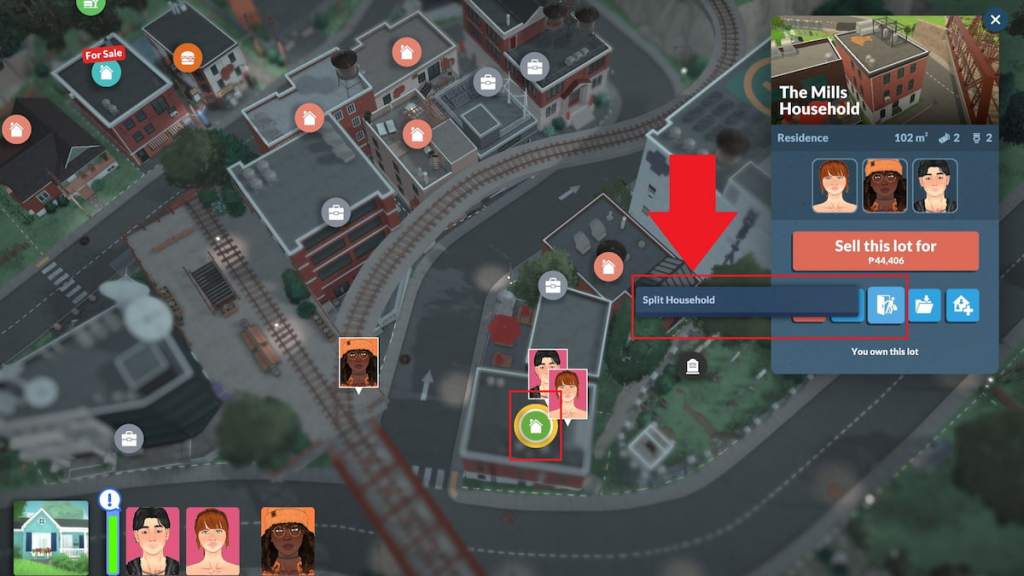
How to move households in Paralives
If you’re trying to move to a different household instead of having your current one change locations, you can do so by zooming out to the world map, locating the household you wish to move to, and selecting the “Switch to this household” option after clicking on them.
How to move into an occupied lot in Paralives
If the lot you have your eye on already belongs to another household, you’ll have to put in a bit of extra work to make it yours. Head to the map, click on the household that owns it, and switch over to them. Then, follow the steps listed above to sell the lot. Switch back to your main household and click on the now empty plot of land to make it yours.
Paralives has plenty of other tricky features you might need some help learning about next, like making a donation to the community center, trying for a baby, looking at the community center ruins memorial, and discovering all death types.


